Todo Mobile App
A cross-platform To-Do, Notes, and Calendar app built with React Native and Expo — from UX design in Figma to a clean, scalable architecture.
Hey everyone! Welcome to my personal website and blog. I wanted to share a personal project I recently completed that I'm really proud of: a comprehensive To-Do, Notes, and Calendar application built using React Native with Expo.
This project was a fantastic opportunity for me to wear both hats – designing the user experience and interface from the ground up, and then developing the application to bring that vision to life.
The Design Process: UX First!
Every good application starts with thoughtful design, and this project was no different. My process always begins in Figma. I strongly believe in focusing on the user experience and layout before getting bogged down in aesthetics.
- Wireframing: I started by creating detailed wireframes. This phase was all about defining the core structure, user flow, and ensuring that the layout was intuitive and functional. Where should the task list go? How does a user create a new task? What's the easiest way to view the calendar? Focusing purely on the black and white structure at this stage helped me make critical UX decisions without the distraction of color or imagery.
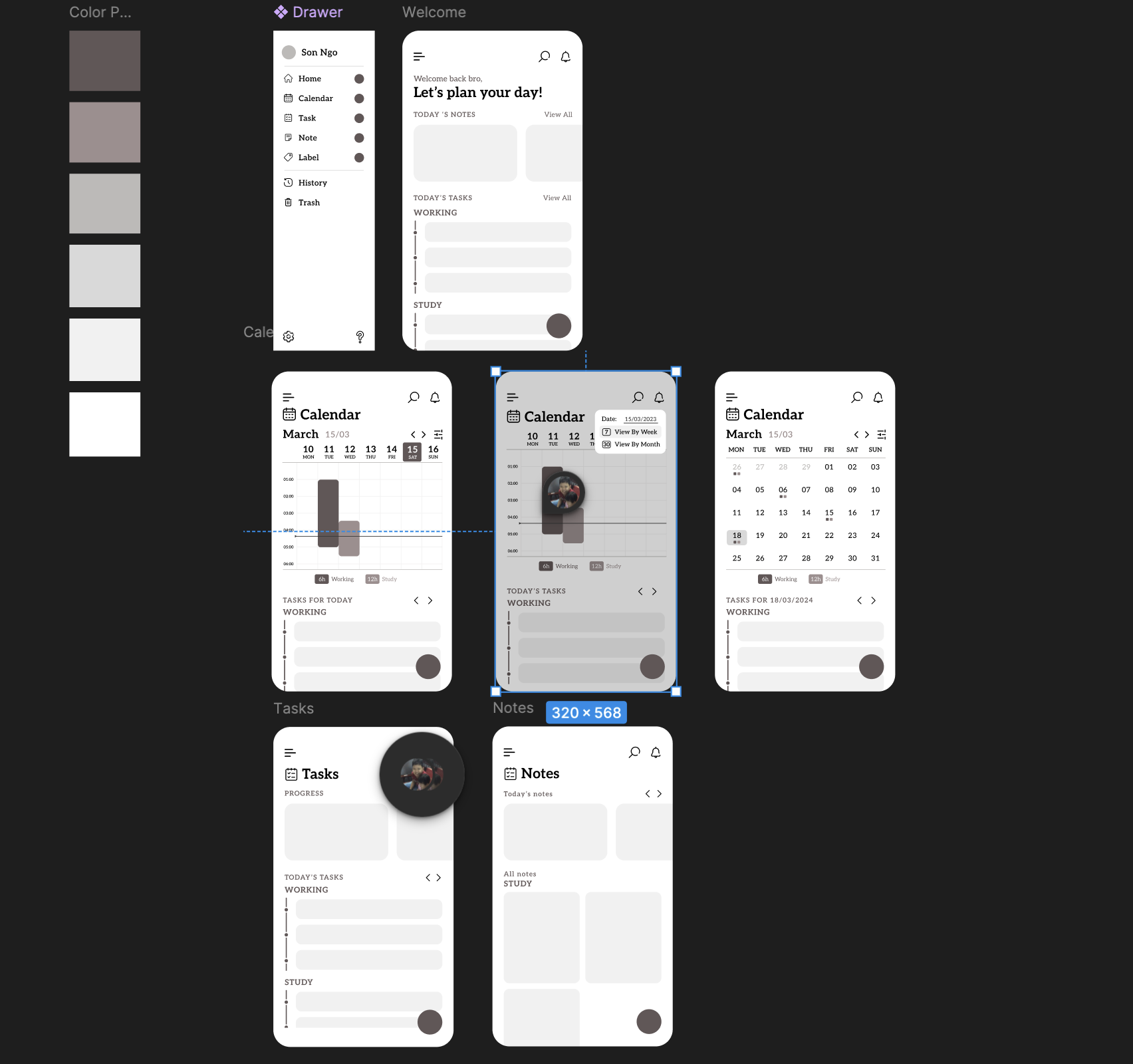
Figure: Wireframe design
- High-Fidelity Design: Once the wireframes felt solid and the user flows were mapped out, I moved on to adding color, typography, and imagery. This is where the application started to gain its personality. I focused on creating a clean, modern, and user-friendly interface that would make managing tasks a pleasant experience, not a chore. Ensuring strong UI principles complemented the foundational UX work was key here.
This dual approach of prioritizing functionality and user flow first, then layering on a polished visual design, is how I approach all my projects, aiming to create applications that are both powerful and a joy to use.
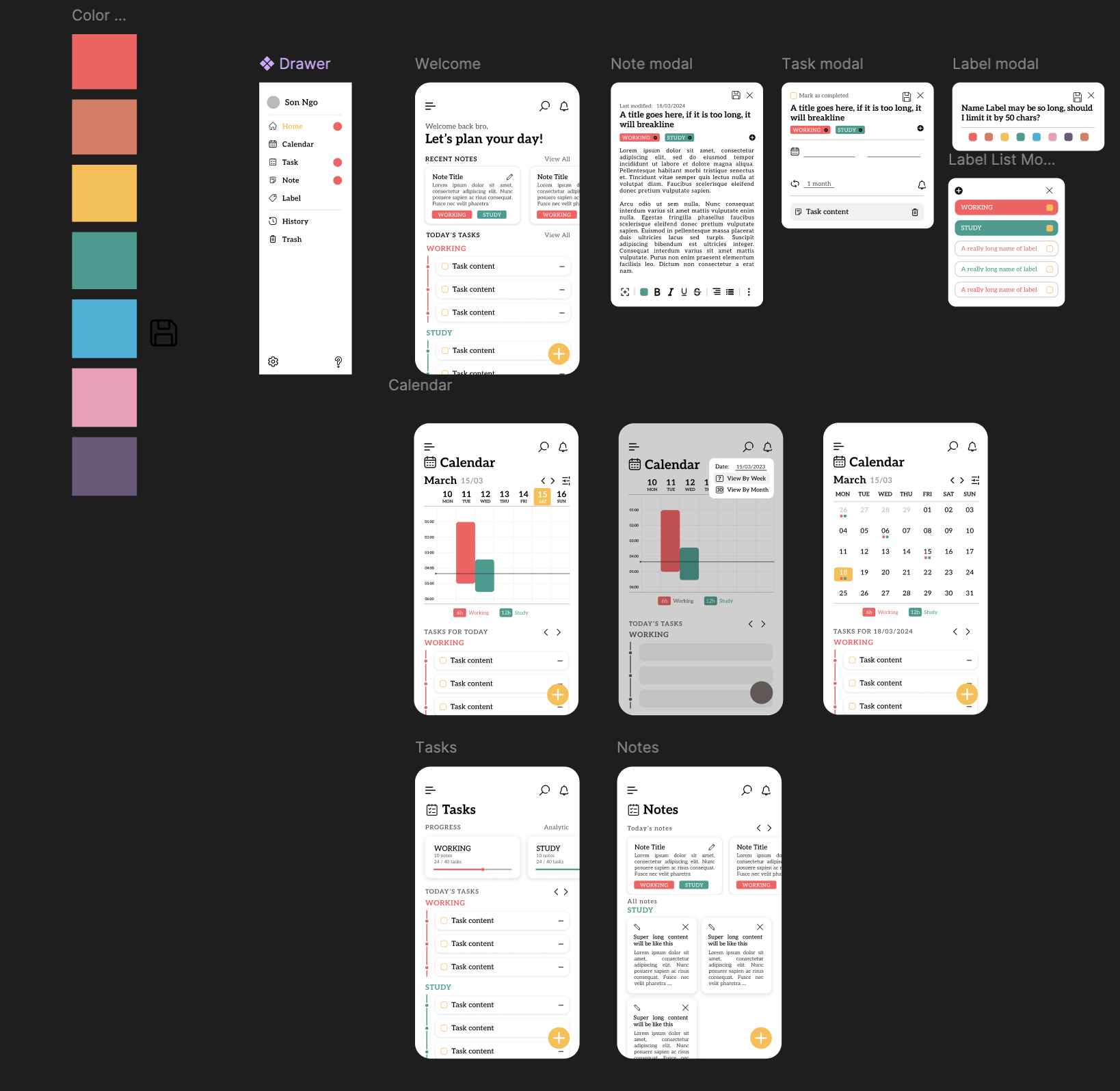
Figure: High-Fidelity Design
Key Features
So, what does this app actually do? It's designed to be a central place for managing your life, combining tasks, notes, and calendar events seamlessly.
Here are some of the core features I built:
- Task Management: The heart of the app. You can easily create, edit, and delete tasks. I implemented features like setting due dates, repeat intervals (daily, weekly, monthly!), and reminders. Tasks can be grouped by labels, and you can even see progress towards completing tasks within a specific label. It handles both all-day events and time-specific tasks.
- Calendar View: Get a visual timeline of your scheduled tasks. This view is smart enough to generate instances for your recurring tasks and allows you to filter and organize based on date.
- Color-Coded Labels: Stay organized by tagging tasks and notes with custom, color-coded labels. You can easily track progress within labels and filter your content.
- Integrated Notes: Jot down ideas or details and associate them directly with tasks if needed. Notes can also be tagged with labels for easy retrieval.
- Robust Local Storage: Using a Data Access Object (DAO) pattern, the app stores all your data locally. I focused on creating a well-structured data model for tasks, notes, and labels. This careful structuring means the transition to cloud storage (like a remote database) would be incredibly fast and straightforward in the future.
App Architecture
I structured the application following a clean architecture pattern. The core idea is to separate concerns strictly, making the app easier to understand, maintain, and test. Think of it as layers, where each layer only knows about the layer directly beneath it.
Here's how the layers are organized and how they interact:
UI Components -> Controllers -> Services Layer -> DAO (Data Access Objects) -> Entity
UI Components:
- This is the presentation layer – everything the user sees and interacts with.
- Crucially, UI Components are kept "dumb" – they focus solely on rendering information and capturing user input. They don't contain complex business logic. When a user performs an action, the UI component simply passes that action along to the layer above it... the Controller.
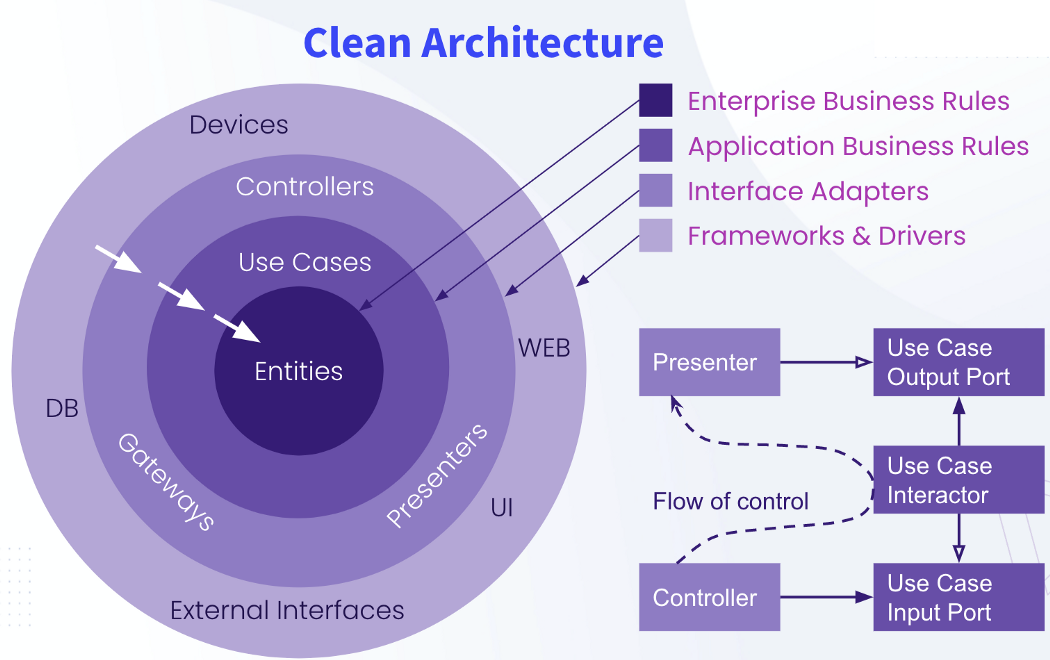
Figure: Clean Architecture
Controllers Layer:
- Controllers are the intermediaries between the UI and the core logic.
- I implemented Controllers primarily using custom hooks (like
useTasksData). These hooks manage the UI-specific state derived from the data and handle the application's business logic related to presenting that data. - When a UI Component needs data or a user performs an action, it interacts only with a Controller hook. The Controller then decides what needs to happen and communicates with the layer below it: the Services Layer.
Services Layer:
- Services handle the rules and logic for their respective data types (ex: TaskServices).
- They don't know how data is stored; they just know they can get or save data by talking to the next layer: the DAOs.
Data Access Objects (DAOs):
- The DAO layer is responsible for abstracting how the data is persisted. In this project, it handles local storage.
- Services interact with DAOs to perform CRUD (Create, Read, Update, Delete) operations on the data. This layer works directly with the Entity (your structured data models for tasks, notes, labels).
- The beauty of the DAO pattern here is maintainability and flexibility. Because the Services only talk to DAOs and are unaware of the underlying storage mechanism. As a result, swapping out local storage for a cloud database in the future would involve changing only the DAO layer, leaving the Services and Controller logic largely untouched. This is exactly why the well-structured data models make migrating to a database very quick!
This clean architecture wasn't just a theoretical exercise; it made the complex logic (like recurring tasks) manageable and ensures that as the app grows, it remains organized, testable, and easier for me (or another developer) to work on.
Technical Dive
Building a feature-rich application like this requires a solid technical foundation. I chose React Native with Expo for rapid development and access to native device features, and support multi-platform application.
- Complex Date Management: Handling recurring tasks, due dates, reminders, and the calendar view required intricate date logic, for which I used the
dayjslibrary. - Custom Form State: Building forms for task creation and editing involved custom state management using reducers to handle complex input logic and validation.
- Animation with Reanimated: I incorporated
React Native Reanimatedto add smooth transitions and UI effects, enhancing the user experience. - Component Composition: The UI is built by composing many smaller, reusable components, following best practices for React Native development.
- Modular Design: The project structure is organized logically by feature and architectural layer, making the codebase easy to navigate and understand.
Besides the code itself, the project still needs some tools for the implementation. That when git, git hub comes out to help me control code versions, Xcode with its iphone simulations and Android Studio with Android simulations help me testing my app on differents environments.
The Roadblocks: Challenges and Solutions
No significant project is without its challenges, and this app definitely presented some interesting puzzles to solve. Overcoming these difficulties was a huge part of the learning experience and helped me grow as a developer:
- Managing Recurring Tasks: Implementing the logic to correctly generate instances of recurring tasks and handle their completion or overdue states was quite complex. Getting the date calculations and persistence right was crucial.
- State Synchronization: Ensuring that the UI across different screens (e.g., updating a task in a modal and seeing the change reflected instantly in the main list or calendar) stayed perfectly in sync with the underlying data model required careful state management and data flow design.
- Performance Optimization: Mobile performance is different from web development. Optimizing components, especially complex ones like the Calendar view with many child components, was challenging because mobile environments don't offer as many built-in debugging or profiling tools as web browsers. Minimizing unnecessary re-renders was a constant focus.
- React Native Animation: Unlike web development where CSS
transitionmakes simple animations straightforward, implementing animations in React Native, even with a powerful library like Reanimated, requires a deeper understanding of the UI thread and managing animation logic to ensure it doesn't block the main app thread.
Tackling these specific issues head-on taught me valuable lessons about mobile development constraints and effective problem-solving.
Figure: App demonstration
What This Project Shows:
Although the app is not totally correctly function and some bugs still exists, I have gained a range of skills valuable in a professional development environment:
- Full-Stack Thinking (Mobile Focus): Bridging the gap between design (UX/UI) and development to create a cohesive product.
- React Native & TypeScript Proficiency: Building a complex mobile application using modern tools.
- State Management & Data Flow Design: Implementing clear and maintainable ways to handle application data.
- Complex UI Implementation: Building intricate user interfaces from reusable components.
- Clean Architecture Principles: Structuring code for scalability, maintainability, and testability.
- Component-Based Development: Leveraging the power of reusable components.
- Problem-Solving: Tackling and overcoming difficult technical challenges like recurring logic, state sync, and performance optimization unique to the mobile platform.
This project reflects my thoughtful approach to building software – starting with user needs, designing carefully, implementing with clean code principles, and persisting through technical hurdles.
I hope this gives you a good overview of my React Native To-Do App project! Building it was a rewarding experience, and I'm excited about applying these skills to future challenges.
Feel free to explore my other projects or get in touch!